Tool · runs in your browser
TranslucentTB settings.json validator
If TranslucentTB ignores your settings, one value in the file is usually wrong, and the app has quietly loaded defaults for everything. Paste the file here to see exactly which line, with the message TranslucentTB 2026.2 logs.
Nothing is uploaded. The check runs on this page.
Waiting for a file
Paste settings.json on the left. Results update as you type.
What the validator checks
It reproduces the parser in TranslucentTB 2026.2 (ConfigManager::LoadFromFile and the Deserialize functions in Common/config), so the first error it reports is the one TranslucentTB writes to its log. It also adds hints the app does not give.
For example, these are the real dialogs TranslucentTB showed in our Windows test. The validator reports the same messages, with the line number.
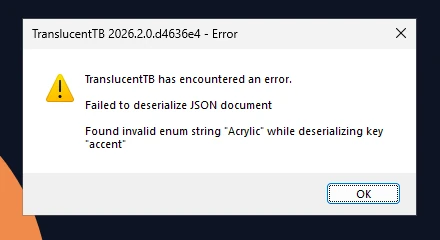
How this was captured
Captured October 29, 2026 on Windows build 26100 in our hands-on test; only cropped and resized. Settings used:
{ "desktop_appearance": { "accent": "Acrylic", "color": "#00000000" } }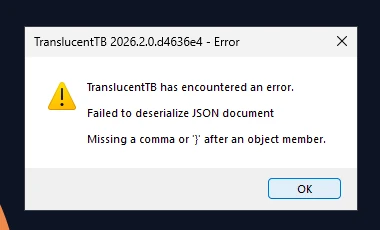
How this was captured
Captured October 29, 2026 on Windows build 26100 in our hands-on test; only cropped and resized. Settings used:
{ "desktop_appearance": { "accent": "clear", "color": "#00000000" } "oops": 1 }| Check | What TranslucentTB does | Result |
|---|---|---|
| JSON syntax | Parses with comments (//, /* */) and trailing commas allowed. Single quotes, missing commas or unclosed strings fail. | All settings reset |
| Wrong type | "true" (a string) where a boolean is expected, a number in quotes, an object where a list is expected. | All settings reset |
| Unknown accent or verbosity | Values are case-sensitive: "Acrylic" and "Blur" are invalid. | All settings reset |
| Invalid color | Must start with # and have 3, 4, 6 or 8 hex digits. Alpha is the last pair. | All settings reset |
| Invalid language | Must look like de or de-DE (lowercase language, uppercase region). | All settings reset |
| Unknown key | Logged at "info" level and skipped. Typos like "blur_raduis" silently do nothing. | Key ignored |
| blur_radius above 750 | Capped at 750 (a Direct2D limit). | Value changed |
| Empty file | Treated as "no settings": defaults, no error. | Defaults |
Questions
Why did TranslucentTB reset all my settings?
Where do I see TranslucentTB's own error?
Does the validator know about every setting?
copy_dlls and use_xaml_context_menu, which are not in the official schema description. Keys it does not know are listed as ignored, which is also what the app does.My file passes but the taskbar still does not change.
Keep going
Something wrong or out of date? Email hello@translucenttb.dev and we will fix it.