Download
TranslucentTB download
The latest version is 2026.2, released August 31, 2026. It is free, and there are only two official sources: the Microsoft Store and the TranslucentTB GitHub releases page. Everything else is a copy.
On this page
Short answer
Which TranslucentTB download should I use?
Use the Microsoft Store version (ID 9PF4KZ2VN4W9). It works on Windows 10 and 11, updates itself and is signed by Microsoft. If the Store is blocked, run winget install CharlesMilette.TranslucentTB or open the .appinstaller file from GitHub. Only pick the portable zip on Windows 11 when you cannot install apps.
Official download sources
TranslucentTB is published by its developers in two places. Both deliver the same build of 2026.2:
Package managers such as winget, Scoop and Chocolatey do not host their own builds. They download these same GitHub files, which we checked by comparing their manifests with our hashes (see Verify your download).
The files on the 2026.2 release
A GitHub release of TranslucentTB has four files. You only ever need one of them.
| File | Size | What it is | Use it if |
|---|---|---|---|
TranslucentTB.appinstaller | 2,563 bytes | A small XML file. Windows' App Installer reads it, downloads the package and its runtime dependencies, and checks for updates every 24 hours. | You cannot use the Store but want automatic updates. |
bundle.msixbundle | 4,173,869 bytes | The installer package itself: x64 and ARM64 builds plus high-DPI images. The .appinstaller file and winget both point to it. | You install it from a script or an offline PC that already has the dependencies. |
TranslucentTB-portable-x64.zip | 1,769,775 bytes | The app unpacked into a folder, no installation. Windows 11 only. | Windows 11 on an Intel or AMD PC, and you do not want to install anything. |
TranslucentTB-portable-arm64.zip | 1,725,478 bytes | The same portable app built for ARM64. | Windows 11 on an ARM PC (Snapdragon). |
On older releases you may also see vclibs-*.appx and winui-*.appx. Those are Microsoft runtime packages that the App Installer file pulls in automatically. You do not need to download them yourself.
Which one should you pick?
Every option below runs the same program. The differences are how it updates, where it stores settings.json, and whether "Open at boot" works from the tray menu.
| Source | Updates | Windows 10 | settings.json | Admin | Open at boot |
|---|---|---|---|---|---|
| Microsoft Store | Automatic | 1903 and later | Package folder | No | Tray toggle |
| winget | winget upgrade | 1903 and later | Package folder | No | Tray toggle |
| App Installer file | Checks every 24 h | 1903 and later | Package folder | No | Tray toggle |
| Chocolatey | choco upgrade | 1903 and later | Package folder | Yes (choco runs elevated) | Tray toggle |
| Portable zip | Manual | No | Next to the .exe | No | Startup folder shortcut |
| Scoop | scoop update | No (portable zip) | Scoop persist folder | No | Startup folder shortcut |
"Package folder" means %LOCALAPPDATA%\Packages\28017CharlesMilette.TranslucentTB_v826wp6bftszj\RoamingState\settings.json
Chocolatey installs the same .msixbundle with Add-AppxPackage, so after installation it behaves exactly like the Store or winget version. Scoop unpacks the portable zip and keeps your settings.json across updates.
Verify your download
We downloaded every 2026.2 file from GitHub on October 29, 2026 and computed its SHA-256 hash. If your copy has a different hash, it is not the official file.
| File (2026.2) | Size | SHA-256 |
|---|---|---|
bundle.msixbundle | 4.17 MB | 3f740e7019e11ff455af374945edb25413e0567c1eb6a16afefb23a496545649 |
TranslucentTB-portable-x64.zip | 1.77 MB | 0dbe8e0255c20e131cde536dcd0ae490d45989a7d360e26d0150dff1922ac420 |
TranslucentTB.appinstaller | 3 KB | daa91439ea64a7611bd81322cee4d8d9b2067176a5286398822dcd6fbbcdfb8e |
The ARM64 portable zip hashes to 81b2f386bd4776a2d9f5c44d8a9b5b3aebccd2eeffaa53435eac24aa38797c82, which matches the hash in the Scoop Extras manifest. The Chocolatey package embeds a .msixbundle with the same SHA-256 as the GitHub one above.
Open PowerShell in your Downloads folder
In File Explorer, open the folder, click the address bar, type
powershelland press Enter.Compute the hash
PowerShellGet-FileHash .\TranslucentTB-portable-x64.zip -Algorithm SHA256Compare the
Hashcolumn with the table. Case does not matter.Check the signature (portable .exe)
PowerShellGet-AuthenticodeSignature .\TranslucentTB.exe | Format-List Status, SignerCertificateStatusshould beValidand the signer subject should containCN=Charles Milette.
Who signed the files
We read the signatures inside the 2026.2 files directly:
- bundle.msixbundle is signed with a Microsoft Store certificate (issuer
Microsoft Marketplace CA G 028, subjectCN=04797BBC-C7BB-462F-9B66-331C81E27C0E). That subject is the publisher ID in the package identity, and it is why Windows shows the publisher as Charles Milette, the lead developer. - TranslucentTB.exe and its DLLs in the portable zip are signed with a certificate for
CN=Charles Milette, L=Greenfield Park, S=Québec, C=CA, issued byMicrosoft ID Verified CS EOC CA 03. This is Microsoft's Trusted Signing service, which the project moved to in 2024.
Both signatures chain to Microsoft roots, so Windows can check them without anything extra installed. More on what the program does once it runs: Is TranslucentTB safe?
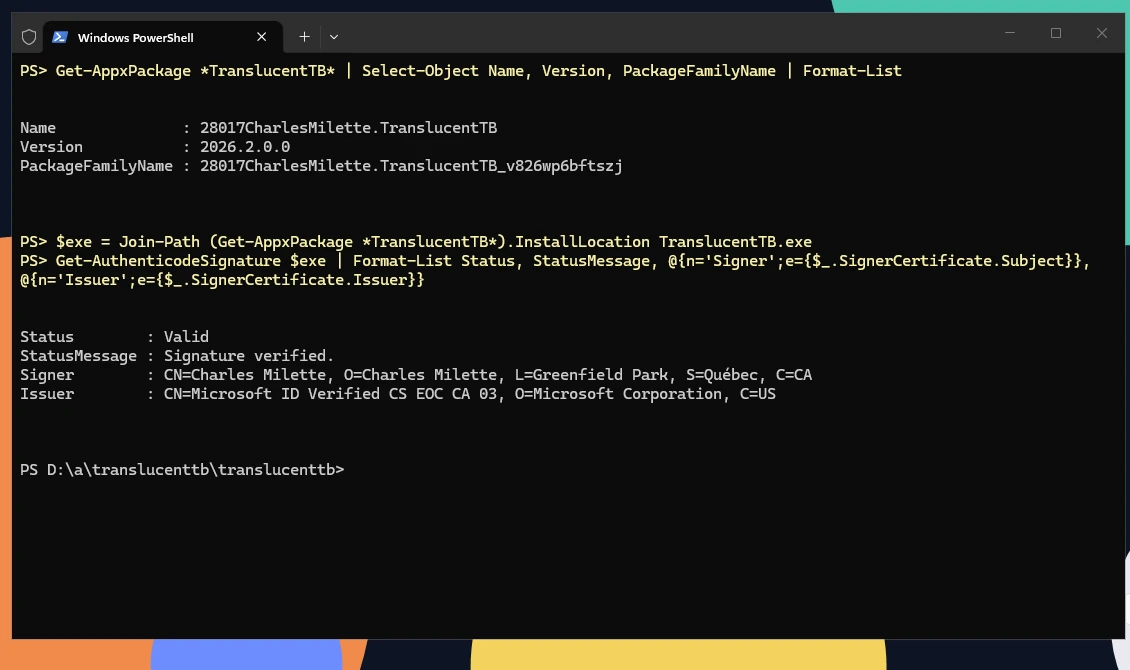
How this was captured
Captured October 29, 2026 on Windows build 26100 in our hands-on test; only cropped and resized.
Avoid download mirror sites
If you already ran a file from a mirror, check it against the hashes above. If it does not match, uninstall it, run a malware scan, and install from the Store. See Uninstall & reset.
How many people download it
GitHub counts every download of every release file. Across all releases since 2017 that adds up to 56,556,427 downloads. Most of it comes from the installer package, because every App Installer update check that finds a new version downloads it again. Microsoft Store installs are not counted here at all.
Source: GitHub Releases API, fetched Oct 29, 2026
Show the data
| File | Downloads |
|---|---|
bundle.msixbundle | 3.2M |
TranslucentTB.appinstaller | 83.6k |
TranslucentTB-portable-x64.zip | 73.6k |
TranslucentTB-portable-arm64.zip | 9,713 |
Source: GitHub Releases API, fetched Oct 29, 2026
Show the data
| File type | Downloads |
|---|---|
| Installer package | 52.9M |
| Portable zip | 1.8M |
| App Installer file | 867k |
| Dependency | 742k |
| Symbols | 210k |
So these numbers measure traffic, not people. The Store page shows a separate measure of popularity: 7,715 ratings with an average of 4.6 on October 29, 2026.
Development builds
The developers publish an automatic build of every change to the develop branch on Azure Pipelines. These builds may not work and can contain half-finished features. Use them only to test a fix the developers asked you to try, and go back to the Store version afterwards. What is waiting in develop right now is listed under Coming next.
Older versions
Every past release, back to 2017.1, stays on the GitHub releases page. Installing an older package over a newer one is blocked by Windows, so uninstall first. The App Installer file also forces you back to the latest version (it sets ForceUpdateFromAnyVersion). Releases before 2021.4 shipped a classic TranslucentTB-setup.exe and do not support current Windows 11 taskbars. The full history is on Releases.
FAQ
Is TranslucentTB free?
Is there a TranslucentTB .exe installer?
.appinstaller file) or as a portable zip that contains TranslucentTB.exe. An "installer.exe" from a download site is not official.Can I download TranslucentTB without the Microsoft Store?
winget install CharlesMilette.TranslucentTB), the TranslucentTB.appinstaller file from GitHub, or on Windows 11 the portable zip. Step by step: Install guide.Does the portable version work on Windows 10?
Which file do I need for an ARM laptop?
.msixbundle contain both x64 and ARM64 builds and pick the right one. For portable use, download TranslucentTB-portable-arm64.zip.Why does my antivirus flag the download?
Is there a 32-bit (x86) version of TranslucentTB?
Can I download TranslucentTB for Windows 7 or 8.1?
Is there an offline installer?
bundle.msixbundle from the GitHub release on any PC, copy it over, and install it with a double-click or Add-AppxPackage. If the target PC lacks the runtime packages, install them first; the install guide has the exact files.Keep going
Something wrong or out of date? Email hello@translucenttb.dev and we will fix it.