Install guide
How to install TranslucentTB
The fastest way is the Microsoft Store: click Get, then open TranslucentTB from Start. This page covers every other official route too, including what the portable build quietly needs that most guides miss.
On this page
Short answer
How do I install TranslucentTB?
Open PowerShell or Windows Terminal and run:
winget install CharlesMilette.TranslucentTBOr open the Microsoft Store page and click Get. Then start TranslucentTB from the Start menu, click Continue on the welcome page, and right-click its tray icon to change the look.
Requirements
These come from the 2026.2 package manifest and the portable executable, which we unpacked and read.
| Requirement | Installed package | Portable / Scoop |
|---|---|---|
| Windows | Windows 10 version 1903 (build 18362) or later, Windows 11 | Windows 11 only |
| CPU | x64 or ARM64 (one bundle has both) | Separate x64 and ARM64 zips |
| Runtimes | Installed for you: Microsoft.VCLibs.140.00, Microsoft.VCLibs.140.00.UWPDesktop, Microsoft.UI.Xaml.2.8 | You need the Visual C++ 2015–2022 Redistributable, plus Microsoft.VCLibs.140.00 and Microsoft.UI.Xaml.2.8 already on the PC |
| Admin rights | No (Chocolatey itself runs elevated) | No |
| Disk | About 4 MB package | About 3.7 MB unpacked |
The manifest says the package was last tested on Windows 10.0.26100 (Windows 11 24H2). Newer builds install it without complaint; whether the effect works depends on Explorer changes in that build, and large Windows updates and Insider builds have broken TranslucentTB before. "Installed package" covers the Store, winget, App Installer and Chocolatey. See the Windows 11 guide and the Windows 10 guide.
Pick a method
Best for almost everyone: automatic updates, signed by Microsoft, works on Windows 10 and 11. Steps below.
The same package from the command line. Good for new-PC scripts. Steps below.
For PCs without the Store. A small file from GitHub that installs the package and checks for updates daily. Steps below.
Windows 11 only, no installation, settings stored next to the .exe. Steps below.
Community package managers. Scoop installs the portable zip; Chocolatey installs the MSIX package. Scoop · Chocolatey
Install from the Microsoft Store
Open the TranslucentTB Store page
Go to the TranslucentTB Store listing or search for "TranslucentTB" in the Microsoft Store app. The product ID is
9PF4KZ2VN4W9.Click Get (or Install)
The Store downloads the package and any runtime packages it needs. No admin prompt appears: MSIX apps install for your user only.
Open TranslucentTB
Click Open in the Store, or find TranslucentTB in Start. You can also press Win+R and type
ttb: the package registersttb.exeas a command alias.
Prefer the command line but want the Store version? winget can install from the Store source:
winget install 9PF4KZ2VN4W9 --source msstoreOnce installed, it shows up in Start search like any app (screenshot from our Windows test):
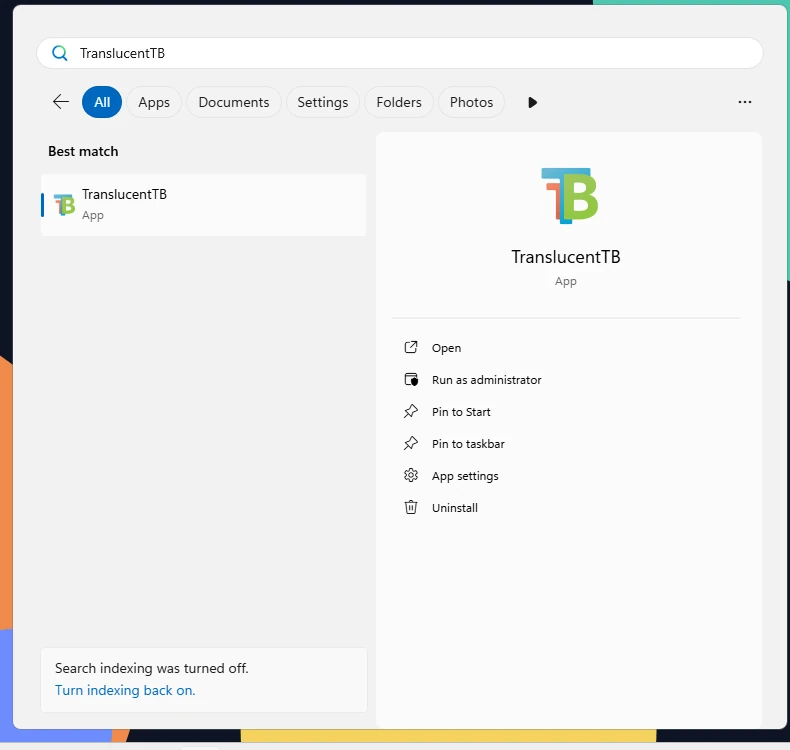
How this was captured
Captured October 29, 2026 on Windows build 26100 in our hands-on test; only cropped and resized.
Install with winget
winget is built into Windows 11 and current Windows 10 as part of App Installer. The community package CharlesMilette.TranslucentTB points at the official GitHub .msixbundle.
winget install CharlesMilette.TranslucentTB
winget list TranslucentTB
winget upgrade CharlesMilette.TranslucentTBThe first command installs, the second shows the installed version, the third updates it. The winget package does not update itself in the background, so run winget upgrade --all now and then.
This is what it looks like on a clean machine (from our Windows test):
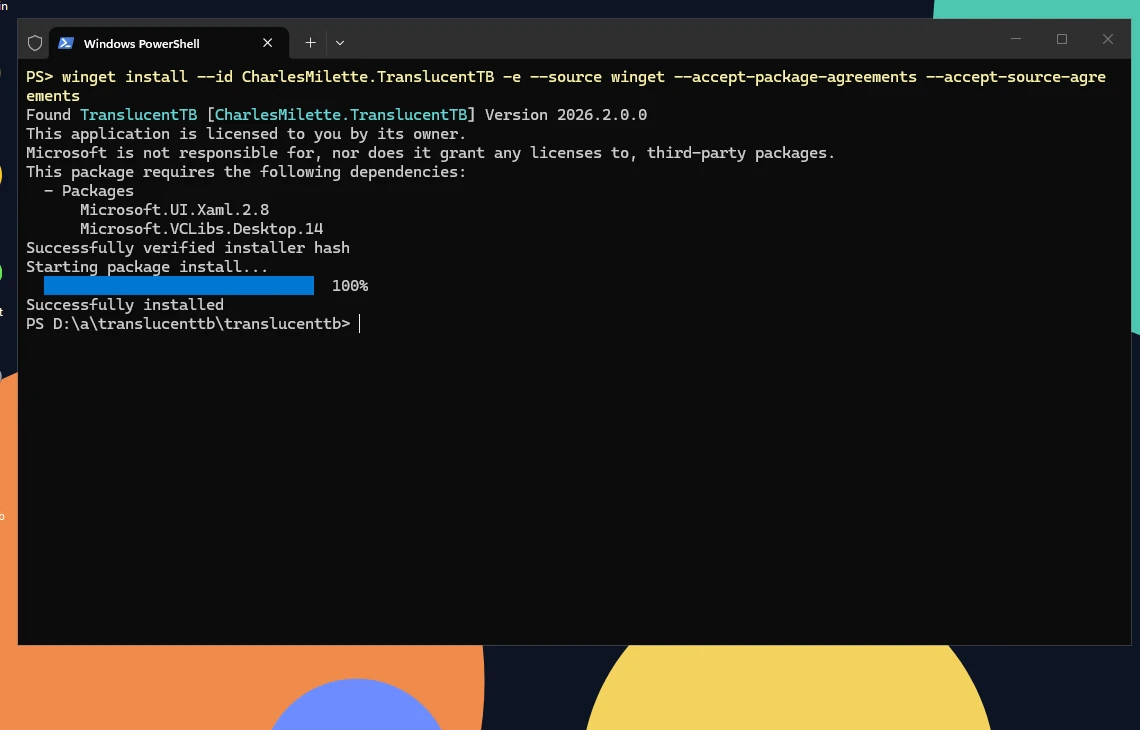
How this was captured
Captured October 29, 2026 on Windows build 26100 in our hands-on test; only cropped and resized.
Install with the App Installer file
Use this when the Store is blocked or removed. The TranslucentTB.appinstaller file describes the package and its dependencies, and Windows' App Installer does the rest.
Download TranslucentTB.appinstaller
Get it from the latest GitHub release. It is a 2,563-byte XML file.
Open the downloaded file
Double-click it. App Installer shows the app name, publisher and version. Click Install. Open the file from your Downloads folder rather than from a browser link: Microsoft turned off the
ms-appinstaller:web protocol by default in December 2023.Let it fetch the dependencies
For 2026.2 the file pulls these packages from GitHub when they are missing (both x64 and ARM64 entries are listed):
Package Version Downloaded from Microsoft.VCLibs.140.00.UWPDesktop14.0.33728.0 release 2024.3, vclibs-desktop-*.appxMicrosoft.VCLibs.140.0014.0.33519.0 release 2024.3, vclibs-uwp-*.appxMicrosoft.UI.Xaml.2.88.2501.31001.0 release 2026.1, winui-*.appx
The file also turns on automatic updates. Its UpdateSettings tell Windows to check every 24 hours when the app starts, to check in a background task, and to accept any newer version (ForceUpdateFromAnyVersion). That is why an App Installer install keeps itself current much like the Store version.
Install on Windows 10/11 LTSC or without the Microsoft Store
LTSC editions and some company PCs have no Microsoft Store, and often no App Installer either, so double-clicking .appinstaller does nothing. If winget works on the PC, use the winget method. Otherwise install the package and its three runtime packages directly with PowerShell. These are the exact files and commands we used on our clean Windows test machine (test report), and they installed TranslucentTB 2026.2 without the Store:
$rel = 'https://github.com/TranslucentTB/TranslucentTB/releases/download'
Invoke-WebRequest "$rel/2026.2/bundle.msixbundle" -OutFile bundle.msixbundle
Invoke-WebRequest "$rel/2024.3/vclibs-desktop-x64.appx" -OutFile vclibs-desktop-x64.appx
Invoke-WebRequest "$rel/2024.3/vclibs-uwp-x64.appx" -OutFile vclibs-uwp-x64.appx
Invoke-WebRequest "$rel/2026.1/winui-x64.appx" -OutFile winui-x64.appx
Add-AppxPackage -Path .\bundle.msixbundle -DependencyPath .\vclibs-desktop-x64.appx, .\vclibs-uwp-x64.appx, .\winui-x64.appxOn an ARM64 PC, replace x64 with arm64 in the three dependency file names; those files are on the same releases. The dependency files live on older release pages (2024.3 and 2026.1) because the developers attach them only when they change; the .appinstaller file of 2026.2 points to exactly these. No administrator rights are needed. To check the result, run Get-AppxPackage *TranslucentTB*.
Install the portable version (Windows 11)
The portable zip runs without installing. Your settings live in settings.json in the same folder as TranslucentTB.exe. It has three requirements that the zip does not include.
1. Windows 11. TranslucentTB uses Windows' Dynamic Dependencies API (api-ms-win-appmodel-runtime-l1-1-5) to load its UI framework without an install. Windows 10 does not have it, so the app stops with Portable mode only works on Windows 11.
2. Two framework packages. Microsoft.VCLibs.140.00 14.0.33519.0 or newer and Microsoft.UI.Xaml.2.8 8.2501.31001.0 or newer. Most Windows 11 PCs have them because Store apps use them. If one is missing you get TranslucentTB cannot start in portable mode because Microsoft.UI.Xaml.2.8_8wekyb3d8bbwe (version 8.2501.31001.0) is not installed on the system.
3. The Visual C++ 2015–2022 Redistributable. We read the import table of the portable TranslucentTB.exe: it links directly to MSVCP140.dll, MSVCP140_ATOMIC_WAIT.dll, VCRUNTIME140.dll and VCRUNTIME140_1.dll. Without the desktop runtime, Windows refuses to start it with "The code execution cannot proceed because MSVCP140.dll was not found." Installed versions do not need this, because their runtime comes as a package.
Install the Visual C++ runtime if needed
Download it from Microsoft: vc_redist.x64.exe or, on ARM PCs, vc_redist.arm64.exe. Or use winget:
PowerShellwinget install Microsoft.VCRedist.2015+.x64Check the two frameworks
PowerShellGet-AppxPackage Microsoft.VCLibs.140.00, Microsoft.UI.Xaml.2.8 | Select-Object Name, Version, ArchitectureYou need an entry for your CPU architecture with at least the versions above. If one is missing, install
vclibs-uwp-*.appxfrom the 2024.3 release orwinui-*.appxfrom the 2026.1 release withAdd-AppxPackage.Unzip to a folder you can write to
Extract
TranslucentTB-portable-x64.zip(or-arm64) to a folder such as%USERPROFILE%\Apps\TranslucentTB. AvoidC:\Program Files: TranslucentTB savessettings.jsonnext to the .exe, and it cannot write there without admin rights.Run TranslucentTB.exe
The welcome page appears on first run, then the app moves to the tray. It copies
ExplorerTAP.dllandExplorerHooks.dllto%TEMP%\TranslucentTBbefore loading them into Explorer, so you can eject a USB drive after exiting the app. Logs go to the same folder.Start it with Windows (optional)
Portable builds have no "Open at boot" startup task. Press Win+R, type
shell:startup, and create a shortcut toTranslucentTB.exein the folder that opens. More: Open at boot.
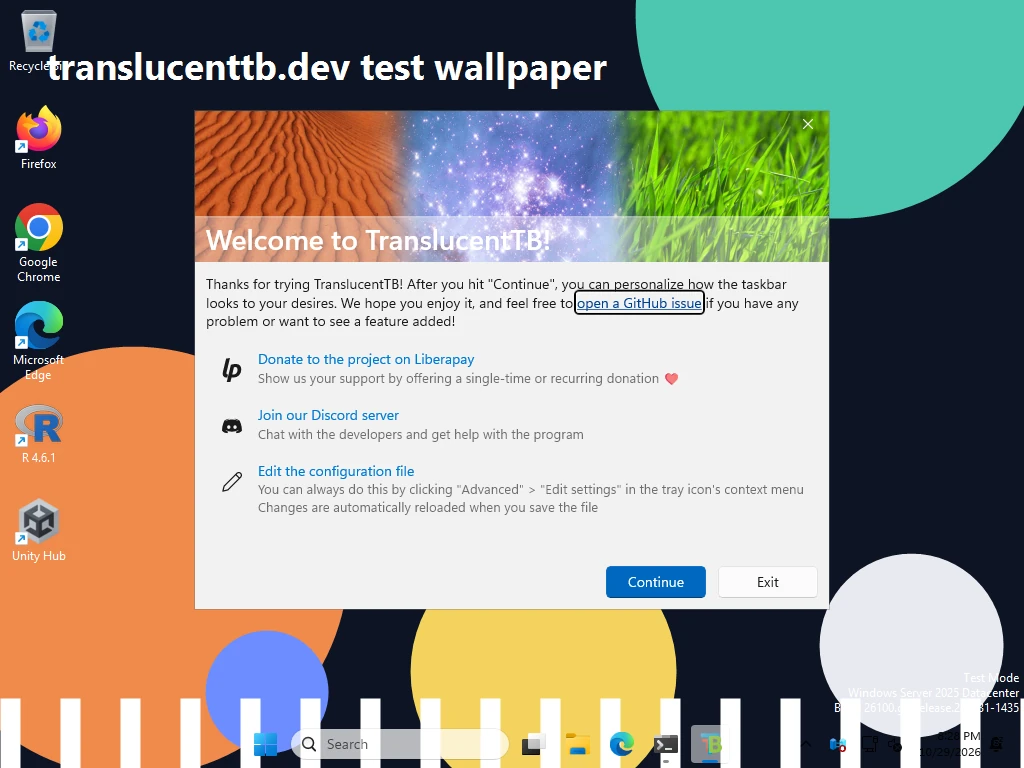
How this was captured
Captured October 29, 2026 on Windows build 26100 in our hands-on test; only cropped and resized.
What is in the zip
| File | Size | What it does |
|---|---|---|
TranslucentTB.exe | 881 KB | The app: tray icon, settings, state machine |
Xaml.dll | 1.13 MB | The XAML UI: tray flyout, color picker, welcome page |
ExplorerTAP.dll | 566 KB | Loaded into Explorer on the Windows 11 XAML taskbar to swap its background brush |
ProgramLog.dll | 414 KB | Logging |
ExplorerHooks.dll | 207 KB | Loaded into Explorer to watch Task View and stop Explorer resetting the taskbar |
resources.pri | 116 KB | Translated strings and assets |
Assets\SplashScreen.jpeg | 163 KB | Splash image |
Assets\SplashScreen.scale-400.jpeg | 207 KB | Splash image, 400% scale |
Install with Scoop
The Scoop package translucenttb lives in the Extras bucket. It downloads the official portable zip (the manifest hash for x64 matches ours), creates a Start menu shortcut, and keeps settings.json in Scoop's persist folder so updates do not wipe it.
scoop bucket add extras
scoop install extras/translucenttb
scoop update translucenttbBecause it is the portable build, everything in the portable section applies: Windows 11 only, and the Visual C++ runtime must be installed.
Install with Chocolatey
The Chocolatey package translucenttb embeds the official .msixbundle (same SHA-256 as GitHub) and installs it with Add-AppxPackage. Its script refuses to run below Windows 10 build 18362. Run it in an elevated PowerShell, as Chocolatey requires:
choco install translucenttb
choco upgrade translucenttbThe result is a normal MSIX install for the user who ran the command, with settings in the package folder and the tray "Open at boot" toggle.
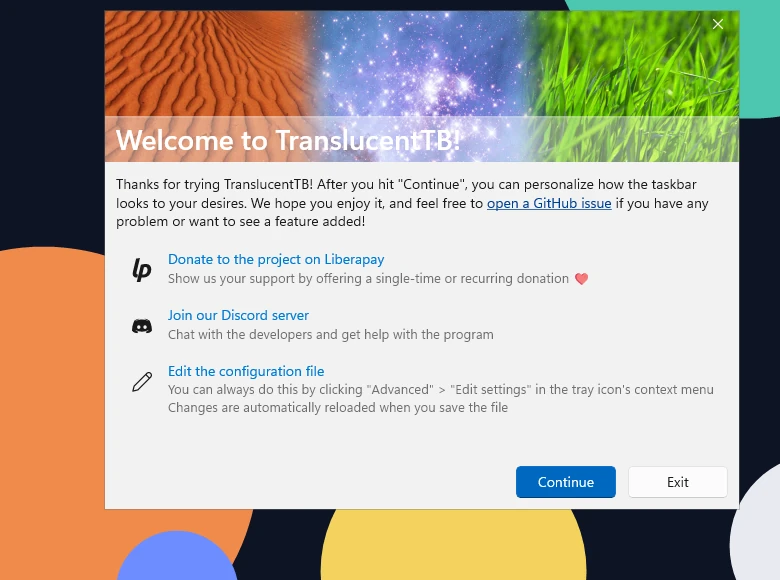
After installing: first run
The first time TranslucentTB starts without a settings file, it shows a Welcome to TranslucentTB! window with three shortcuts: edit the configuration file, join the Discord server, and donate on Liberapay. Click Continue. TranslucentTB writes a default settings.json and shows this notification:
Click Continue on the Welcome page
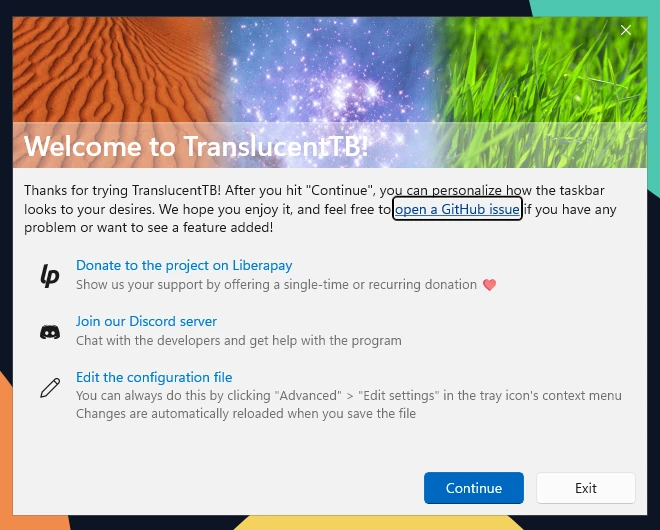
Real screenshot · TranslucentTB 2026.2 · Windows build 26100Step 1: the first time TranslucentTB starts, the Welcome page opens. Click Continue. How this was captured
Captured October 29, 2026 on Windows build 26100 in our hands-on test; only cropped and resized.
Find the icon in the tray overflow
Click the ^ arrow next to the clock. You can drag the icon onto the taskbar to keep it visible.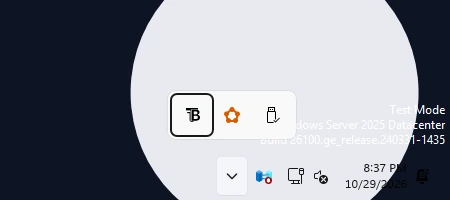
Real screenshot · TranslucentTB 2026.2 · Windows build 26100Step 2: the TranslucentTB icon starts in the tray overflow. Click the ^ arrow next to the clock to see it. How this was captured
Captured October 29, 2026 on Windows build 26100 in our hands-on test; only cropped and resized.
Right-click it to change the look
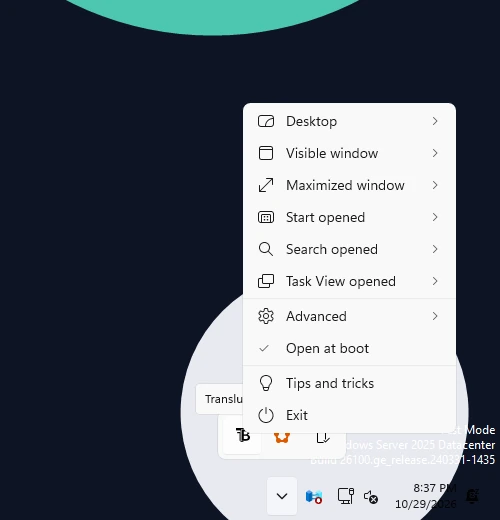
Real screenshot · TranslucentTB 2026.2 · Windows build 26100Step 3: right-click the icon to open the menu. How this was captured
Captured October 29, 2026 on Windows build 26100 in our hands-on test; only cropped and resized.
How this was captured
Captured October 29, 2026 on Windows build 26100 in our hands-on test; only cropped and resized.
TranslucentTB lives in the system tray. Right-click on the tray icon to change settings, set the app to open at boot, view about information, exit the app, etc.
The defaults make the taskbar fully transparent everywhere: Visible window and Maximized window are both off, so the desktop look applies even with windows open. Only Task View switches back to Windows' own look. We confirmed this on Windows build 26100 with the file the app wrote on first run.
desktop_appearance clear, #00000000window open visible state off, so desktop lookwindow maximized maximized state off, so desktop lookCan't find the tray icon?
New tray icons often land in the overflow area. Click the ^ arrow next to the clock. To keep it visible on Windows 11, go to Settings › Personalization › Taskbar › Other system tray icons and turn TranslucentTB on. If it is not there at all, TranslucentTB is not running or hide_tray is set: see Tray icon missing.
Next steps: turn on Open at boot, pick looks in the tray menu, or design all states in the settings builder.
FAQ
Where is TranslucentTB installed?
C:\Program Files\WindowsApps\28017CharlesMilette.TranslucentTB_2026.2.0.0_x64__v826wp6bftszj, which you cannot open without changing permissions. Your settings are elsewhere, in %LOCALAPPDATA%\Packages\28017CharlesMilette.TranslucentTB_v826wp6bftszj\RoamingState. The portable version lives wherever you unzipped it. To print the install folder: (Get-AppxPackage *TranslucentTB*).InstallLocation.Do I need admin rights to install TranslucentTB?
Does TranslucentTB work on Windows 10?
Does TranslucentTB support ARM64?
Why does the portable version say MSVCP140.dll was not found?
TranslucentTB.exe needs the Visual C++ 2015–2022 Redistributable. Install vc_redist.x64.exe (or arm64) from Microsoft and start it again.Can I install the Store version and the portable version together?
How do I update TranslucentTB?
winget upgrade CharlesMilette.TranslucentTB. Scoop: scoop update translucenttb. Chocolatey: choco upgrade translucenttb. Portable: download the new zip and replace the files, keeping settings.json. See how updates arrive.Keep going
Something wrong or out of date? Email hello@translucenttb.dev and we will fix it.