Safety
Is TranslucentTB safe?
Yes, when you get it from the Microsoft Store, winget or the official GitHub releases. We downloaded the 2026.2 release files, checked their signatures and hashes, read what the code does, and looked at exactly why some antivirus tools still flag it.
On this page
Short answer
Is TranslucentTB a virus?
No. TranslucentTB is free, open-source software (GPLv3) with public source code on GitHub. The Store package is signed by Microsoft's Store certificate, and the app's .exe and DLLs are signed by a certificate issued to its lead developer through Microsoft's identity-verified code signing. It has no networking code. Antivirus warnings come from one legitimate behavior: it loads two small DLLs into explorer.exe to restyle the taskbar.
What we checked
| Check | Result for 2026.2 | How we checked |
|---|---|---|
| Source code public | Yes | Cloned TranslucentTB/TranslucentTB; the release is tag 2026.2, commit d4636e4. |
| Store bundle signature | Microsoft Marketplace CA G 028 | Read AppxSignature.p7x in bundle.msixbundle. This is the certificate the Microsoft Store signs packages with. |
| EXE and DLL signatures | CN=Charles Milette, Québec, CA | Read the Authenticode signature of all five binaries. Issuer: Microsoft ID Verified CS EOC CA 03, Microsoft's identity-validated signing service. |
| Network access | None found | Import tables of all five binaries contain no networking DLLs; the source has no HTTP or socket code. The only web addresses are links opened in your browser. |
| Permissions | runFullTrust only | The package manifest declares one capability, which every regular desktop app packaged as MSIX needs. No administrator rights. |
| Telemetry | None found | No analytics or crash-upload code. Logs stay in a local folder. |
| Process hardening | On | HardenProcess() in main.cpp turns on Windows process mitigations: safe DLL search order, termination on heap corruption, strict handle checks, an image signature policy, preferring System32 DLLs, and blocking legacy extension-point DLLs. |
The Store page lists the app's permission as "Uses all system resources". That is how the Store words runFullTrust, which every traditional desktop program effectively has.
Who signs TranslucentTB
TranslucentTB is published by Charles Milette (GitHub: sylveon), who wrote most of the code: 1,794 of the 1,964 commits on the release branch. The Store lists the publisher as Charles Milette and the developer as "TranslucentTB Open Source Developers".
- Store, winget and App Installer install
bundle.msixbundle, signed by the Microsoft Store (subjectCN=04797BBC-C7BB-462F-9B66-331C81E27C0E, the Store's identity for this publisher). Windows refuses to install an MSIX whose signature doesn't verify. - The files inside (and the portable zip) are signed by "Charles Milette" through Microsoft's identity-verified code signing, used since 2024.1. The certificates are short-lived, so the thumbprint changes between releases but the subject stays the same. The 2024.3 notes say an accent was added to "Québec" in the subject.
SHA-256 hashes of the 2026.2 files
We downloaded these from the official GitHub release on October 29, 2026. If your file's hash matches, it is byte-for-byte the official file.
| File (2026.2) | Size | SHA-256 |
|---|---|---|
bundle.msixbundle | 4.17 MB | 3f740e7019e11ff455af374945edb25413e0567c1eb6a16afefb23a496545649 |
TranslucentTB-portable-x64.zip | 1.77 MB | 0dbe8e0255c20e131cde536dcd0ae490d45989a7d360e26d0150dff1922ac420 |
TranslucentTB.appinstaller | 3 KB | daa91439ea64a7611bd81322cee4d8d9b2067176a5286398822dcd6fbbcdfb8e |
Verify a download yourself
Hash the file
In PowerShell, in your Downloads folder:
PowerShellGet-FileHash .\TranslucentTB-portable-x64.zip -Algorithm SHA256Compare the
Hashcolumn with the table above. (Hashes change with every release; this table is for 2026.2.)Check the signature of the program
After extracting the portable zip:
PowerShell$s = Get-AuthenticodeSignature .\TranslucentTB.exe $s.Status Valid $s.SignerCertificate.Subject CN=Charles Milette, O=Charles Milette, L=Greenfield Park, S=Québec, C=CAAnything other than
Valid, or a different name, means don't run it. You can also right-click the file › Properties › Digital Signatures.Prefer the Store or winget
They verify the package signature for you and keep it updated.
The same check on our test machine (our Windows test):
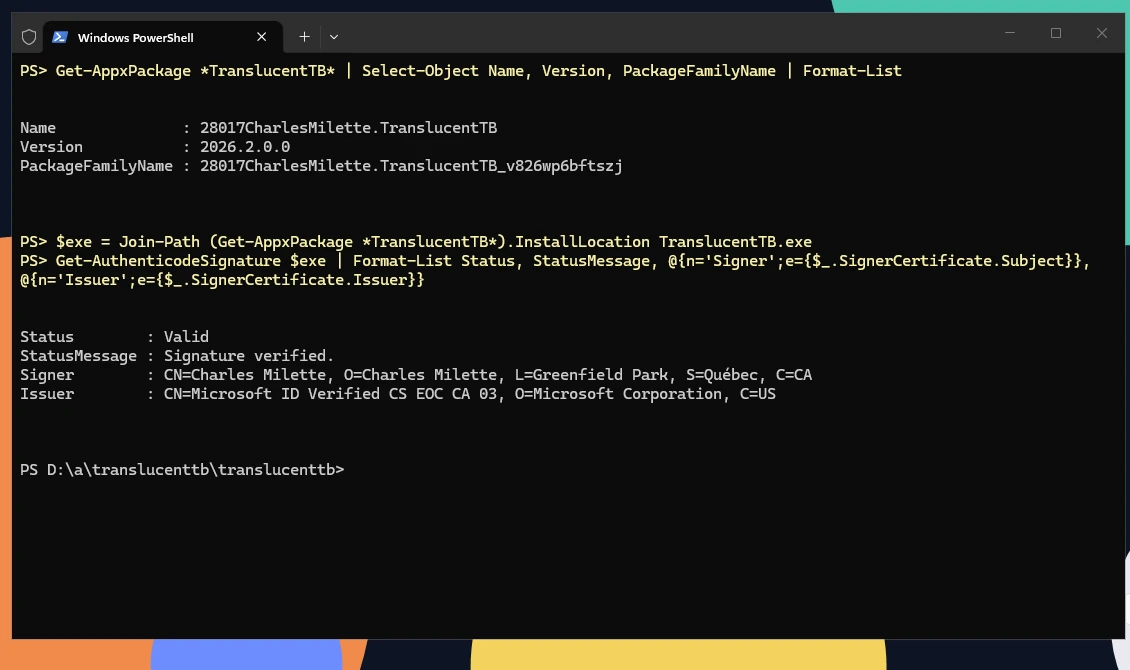
How this was captured
Captured October 29, 2026 on Windows build 26100 in our hands-on test; only cropped and resized.
What loads into Explorer, and why
Windows has no supported setting for a transparent taskbar, so TranslucentTB has to work inside Explorer, the process that draws the taskbar. It loads at most two of its own DLLs there:
| DLL | When | What it does |
|---|---|---|
ExplorerHooks.dll | Windows 10 and classic/mixed taskbars | Loaded with a standard Windows hook (SetWindowsHookEx). It watches Task View and intercepts Explorer's own SetWindowCompositionAttribute calls on the taskbar so Explorer doesn't undo the look. It asks TranslucentTB with a 100 ms timeout, so a frozen TranslucentTB can't freeze Explorer. |
ExplorerTAP.dll | Windows 11 22H2+ XAML taskbar | Attached through XAML Diagnostics (InitializeXamlDiagnosticsEx), the interface Visual Studio's live visual tree uses. It finds the taskbar's background element and swaps its brush. It restores the original brush when TranslucentTB exits or dies. |
Why antivirus software flags it
Loading a DLL into another process (here, explorer.exe) is something malware also does, so heuristic and "potentially unwanted" detections sometimes fire on ExplorerHooks.dll or ExplorerTAP.dll, especially right after a new release before reputation builds up. The README addresses this directly: "Some antiviruses are over eager, so they might flag this program as malicious. IT IS NOT!"
Make sure the file is genuine
Check the hash and signature as above. A genuine, signed file with a heuristic name such as "Generic", "Heur" or "PUA" is a false positive.
Report the false positive
Submit the file to your antivirus vendor's false-positive form; for Microsoft Defender use the Microsoft Security Intelligence submission page.
Then allow it
Add an exclusion only for the verified file or the package folder, not for a whole drive.
Avoid unofficial download sites
Search results for "TranslucentTB download" include mirror sites and AI-written pages that bundle old versions or wrap the app in their own installers. TranslucentTB is only published in three places:
- Microsoft Store: product ID
9PF4KZ2VN4W9(listing). - GitHub releases: TranslucentTB/TranslucentTB releases.
- Package managers that point at those: winget
CharlesMilette.TranslucentTB, Scoopextras/translucenttb, Chocolateytranslucenttb(community-maintained).
There is no paid version, no "pro" edition and no separate installer .exe in current releases. All options: Download.
Privacy
TranslucentTB keeps everything local: settings in settings.json and logs in its own folder (paths in the settings reference). The Discord, donation and GitHub issue links on the welcome page and the tray menu's Tips and tricks entry just open your browser. Updates come from the Microsoft Store or App Installer, not from the app.
FAQ
Is TranslucentTB malware?
Is TranslucentTB from the Microsoft Store safe?
Does TranslucentTB need administrator rights?
Can TranslucentTB break Windows?
Why does Windows SmartScreen warn about the portable version?
What is TranslucentTB.exe and why is it running?
C:\Program Files\WindowsApps\28017CharlesMilette.TranslucentTB_… and is signed by "Charles Milette". If you did not install it, uninstall it and scan the PC; if you did, you can stop it from the tray menu with Exit.Keep going
Something wrong or out of date? Email hello@translucenttb.dev and we will fix it.