Independent guide · checked against TranslucentTB 2026.2
TranslucentTB, explained properly.
TranslucentTB is a free, open-source app that makes the Windows 10 and 11 taskbar clear, blurred or acrylic, and changes it when you open a window or the Start menu. We read its source code, unpacked its installers and documented what it actually does.
- Latest release 2026.2, August 31, 2026
- SHA-256 of every download
- Defaults read from the C++ source
- Every error message, with a fix
- Tested on real Windows (build 26100)
We installed it and tested every setting
Not mock-ups: these are screenshots of TranslucentTB 2026.2 running on a real Windows machine, captured by our own test runs. The tests also caught one of our own mistakes, which we fixed.
clear with #00000000: the taskbar background is gone.

clear with #1D4ED880: blue at 50% alpha, no blur.

opaque with #1D4ED820: the alpha (20) is ignored and the bar is solid.

blur with blur_radius 30: shapes become soft.

normal: TranslucentTB hands the taskbar back to Windows.

How these were captured
Captured October 29, 2026 on Windows build 26100 in our hands-on test; only cropped and resized. Settings used:
{ "desktop_appearance": { "accent": "clear", "color": "#00000000" } }{ "desktop_appearance": { "accent": "clear", "color": "#1D4ED880" } }{ "desktop_appearance": { "accent": "opaque", "color": "#1D4ED820" } }{ "desktop_appearance": { "accent": "blur", "color": "#00000010", "blur_radius": 30 } }{ "desktop_appearance": { "accent": "normal", "color": "#00000000" } }
How this was captured
Captured October 29, 2026 on Windows build 26100 in our hands-on test; only cropped and resized. Settings used:
{ "maximized_window_appearance": { "enabled": true, "accent": "opaque", "color": "#B42318FF" } }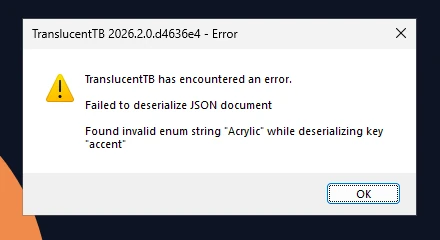
How this was captured
Captured October 29, 2026 on Windows build 26100 in our hands-on test; only cropped and resized. Settings used:
{ "desktop_appearance": { "accent": "Acrylic", "color": "#00000000" } }Five looks, and what each one really does
Every state in TranslucentTB uses one of five accents. They are not just presets: each maps to a different Windows mechanism, and two of them ignore part of your color.
normal
Windows' own taskbar, as if TranslucentTB were not running. Your color is ignored.
opaque
A solid color. The alpha in your color is forced to 100%, so it can never be see-through.
clear
Your color at your alpha, no blur. #00000000 makes the taskbar fully invisible.
blur
A Gaussian blur. On Windows 11 22H2+ its strength is blur_radius ÷ 3; on Windows 10 it is fixed.
acrylic
Fluent acrylic: strong blur, your tint and a grain texture. The default look of the Maximized window state (which is off until you turn it on).
Details, color format and per-Windows-version support: Appearance modes
When two states apply, which one wins?
A maximized window and an open Start menu can both be true. TranslucentTB checks states in a fixed order, read straight from its source. Toggle what is happening on screen and see the result.
Taskbar uses
Visible window
visible_window_appearance
Demo config: all states enabled with different looks. By default on Windows 11, Start and Search are off and battery saver is off. How the order works
Four official ways to install it
All four come from the same developers and the same build. They differ in how updates arrive and where settings are stored. If unsure, use the Microsoft Store.
Microsoft Store recommended
Signed by Microsoft, updates itself in the background, works on Windows 10 and 11.
winget
Same package as the Store, from the command line. Good for scripted setups.
winget install CharlesMilette.TranslucentTBApp Installer file
The .appinstaller from GitHub installs the same MSIX and checks for updates every 24 hours. For PCs without the Store.
Portable zip Windows 11 only
No install, settings next to the .exe. Needs the Visual C++ 2015–2022 runtime and two Store frameworks, which most PCs already have.
The messages people actually see
These are the exact strings from TranslucentTB's resources and logs. Each links to what causes it and how to fix it.
Failed to initialize XAML Diagnostics.Windows 11 refused the helper TranslucentTB loads into Explorer.
Windows Explorer restarted twice in the last 30 seconds!A crash loop guard. Usually another taskbar mod.
TranslucentTB was recently updated. Please restart Windows…Explorer still has the old helper loaded.
Failed to deserialize JSON documentOne typo in settings.json resets every setting.
…asked Windows to enable a startup task but Windows did not enable it.Open at boot broken, usually by a debloat script.
Portable mode only works on Windows 11.Use the Store or App Installer build on Windows 10.
How a taskbar becomes transparent
Windows has no setting for this. TranslucentTB takes two different routes depending on which taskbar you have, and on Windows 11 it has to run a small helper inside Explorer.
Nine years, 24 releases
TranslucentTB ships about once or twice a year. Download counts include automatic updates, which is why recent installer packages count in the millions.
Source: GitHub Releases API, fetched Oct 29, 2026
Show the data
| Release | Downloads |
|---|---|
| 2017.2 | 98.1k |
| 2017.3 | 361k |
| 2018.1 | 26.6k |
| 2018.2 | 327k |
| 2019.1 | 25.7k |
| 2019.2 | 169k |
| 2020.1 | 143k |
| 2020.2 | 444k |
| 2021.4 | 166k |
| 2021.5 | 3.8M |
| 2022.1 | 3.7M |
| 2023.1 | 3.4M |
| 2023.2 | 2.8M |
| 2024.1 | 11.2M |
| 2024.3 | 5.6M |
| 2024.4 | 41.6k |
| 2025.1 | 15.3M |
| 2026.1 | 5.6M |
| 2026.2 | 3.4M |
Everything on translucenttb.dev
Every guide, reference page and tool, grouped by what you are trying to do.
Get it
Learn it
Use the tools
Fix and decide
TranslucentTB FAQ
Short answers to what people search for most. Each links to the full explanation.
What is TranslucentTB?
Is TranslucentTB free and safe?
Does TranslucentTB work on Windows 11 24H2 and 25H2?
How do I make the taskbar fully transparent?
#00000000 is fully invisible. If windows make it change, set Visible window and Maximized window to Clear as well, or turn them off.Where is the TranslucentTB settings file?
%LOCALAPPDATA%\Packages\28017CharlesMilette.TranslucentTB_v826wp6bftszj\RoamingState\settings.json. For the portable version: settings.json in the same folder as TranslucentTB.exe. Open it from the tray icon with Advanced › Edit settings.Why did my settings reset to default?
"Acrylic" instead of "acrylic", TranslucentTB rejects the whole file and uses defaults for everything. Paste your file into the settings validator to find the line.Is TranslucentTB free? Is there a Pro version?
What is TranslucentTB.exe?
C:\Program Files\WindowsApps\28017CharlesMilette.TranslucentTB_…; the portable one from wherever you unzipped it. It is signed by "Charles Milette". If you did not install TranslucentTB on purpose, see Is TranslucentTB safe?Is there TranslucentTB for Mac, Linux or Android?
Does TranslucentTB work on Windows 7 or 8.1?
Does TranslucentTB slow down my PC?
Design every taskbar state, then export settings.json.
Use your own wallpaper, set all seven states and per-app rules, and download a file TranslucentTB will accept the first time.